

“Keep a trading journal” is advice everyone gives and almost nobody makes concrete. So here are four real formats, what an entry looks like in each, and the specific thing each one is bad at.
If you want a single month filled in and analysed end to end, that is a separate piece: a sample trading journal. This one is about choosing the format.
Example 1 — the notebook
3 Mar — EURUSD long, London open pullback. 1%. Followed the plan. Closed +2.2R at the session high. Calm. Nearly moved my stop at breakeven again.
Good at: starting today, costing nothing, and capturing nuance. Handwriting slows you down just enough to think.
Bad at: arithmetic. You cannot group forty entries by setup with a pen. After three months you have a genuinely valuable record and no practical way to interrogate it, which is why notebook journals get abandoned at exactly the point they become useful.
Use it if: you have never journalled before. Two weeks on paper beats two months of intending to build a spreadsheet.
Example 2 — the spreadsheet
| Date | Pair | Setup | Risk | Rule? | State | R |
|---|---|---|---|---|---|---|
| 3 Mar | EURUSD | London open pullback | 1.0% | Yes | Calm | +2.2 |
| 4 Mar | GBPJPY | News fade | 1.8% | No | Annoyed | -1.0 |
Good at: everything the notebook can't do. A pivot table answers “which setup actually pays” in about ten seconds, and that single question is worth more than most trading education.
Bad at: staying maintained. Spreadsheets accrete columns. Formulas break silently. Screenshots go in a folder that stops matching the rows. And the honest failure mode is that you end up maintaining a small database instead of reviewing your trading — I ran Google Sheets for trades and Notion for mistakes for years before building something else, and the admin, not the discipline, is what eventually broke.
Use it if: you want full control and don't mind being the maintenance department.
Example 3 — the Notion or note-app journal
A database with a page per trade: chart image at the top, structured fields down the side, freeform notes underneath.
Good at: mixing pictures and prose. If your review is genuinely visual — annotated charts, before-and-after — this is the nicest of the four to read back.
Bad at: maths, again, and worse than a spreadsheet. Rollups get fiddly, and R-multiples across a hundred pages are painful. There's also a subtler problem: a page-per-trade format quietly rewards writing more about the interesting trades, which are almost always the winners. Your losses get three lines. The dataset tilts without you noticing.
Use it if: you already live in Notion and your review is picture-led.
Example 4 — the dedicated journal app
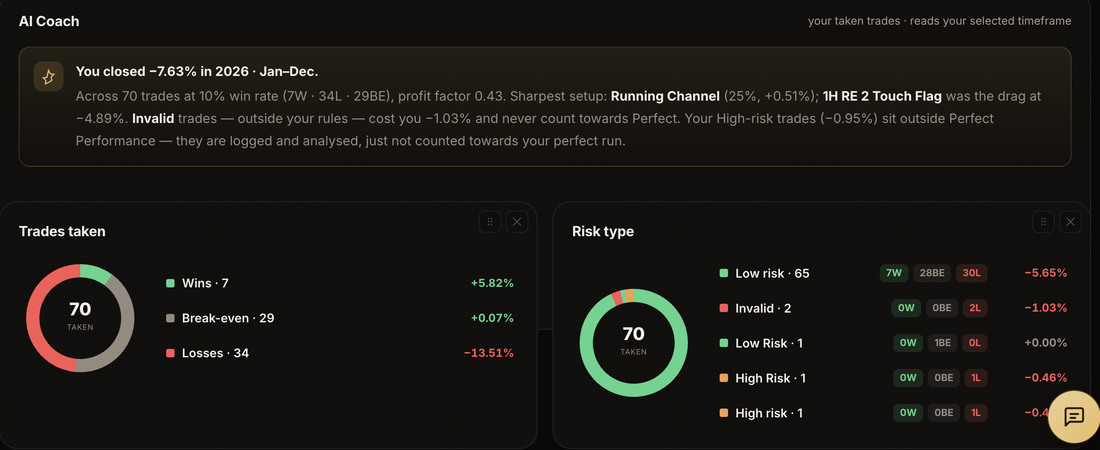
Good at: removing the maintenance. Grouping, R-multiples, equity curves and win rate are computed rather than built, so the monthly review starts at the analysis instead of at the formulas.
Bad at: flexibility and price. You inherit someone else's opinion about what a trade record should contain, and you pay monthly for it. If their structure doesn't fit how you trade, you will fight it.
Use it if: the admin is what's stopping you reviewing, which for most people who have tried the other three is exactly what happened.
Which format suits you?
Not which is best — which is best for you. Answer honestly; the wrong format is the one you stop using.
Answer the three above and the honest recommendation appears here.
The comparison, honestly
| Notebook | Spreadsheet | Notion | App | |
|---|---|---|---|---|
| Cost | Free | Free | Free–low | Monthly |
| Start today | Yes | An evening | An evening | Yes |
| Group by setup | No | Yes | Awkward | Yes |
| Survives 12 months | Rarely | Sometimes | Sometimes | Usually |
| Missed setups | Manual | Manual | Manual | Depends |
The row that decides it
Look at the bottom row. None of the free formats record the trades you didn't take unless you deliberately build a second sheet for them — and virtually nobody does, because it feels like homework about your own hesitation.
It is also, for most traders who are consistent but not profitable, the larger of the two books. In the worked month the skipped setups were worth more than the entire month's trading. If your chosen format makes that column hard to keep, you will not keep it, and you will never find out what hesitation is costing you.
Whichever you pick, the test is the same: at the end of the month, can you answer “which of my setups lost money?” in under five minutes? If not, the format is wrong for you — regardless of how good it looks.
What to do this week
- Never journalled? Notebook, two weeks, seven fields. Prove you'll do it before you build anything.
- Journalling but not reviewing? The format is costing you. Move to something that groups by setup without you writing formulas.
- Reviewing but not improving? You are almost certainly missing the state column and the skipped-setup log. Add both before changing anything about your strategy.
Exhibit A is the fourth option, built by someone who ran the second and third for years. The missed-trade log is a first-class part of it rather than a bolt-on, and an AI coach writes the monthly review from your own numbers. If you're still deciding what a journal should contain, start with what a trading journal actually is.
Try it free for 14 days. No card needed to start.
Common questions
What does a good trading journal entry look like?
Date, instrument, setup name, planned risk, whether you followed the rule, your state, and the result in R. Seven fields, thirty seconds. Anything longer and you will stop filling it in on the days that matter most.
Is a spreadsheet good enough?
For a long time, yes — it answers the single most valuable question, which is which setup actually pays. It fails on maintenance rather than capability, and it fails slowly.
Do I need screenshots of every trade?
No. Screenshots are useful for a handful of trades you genuinely want to re-examine, and they are the single biggest reason journals become too slow to keep up. Capture them selectively.